Tail Latency
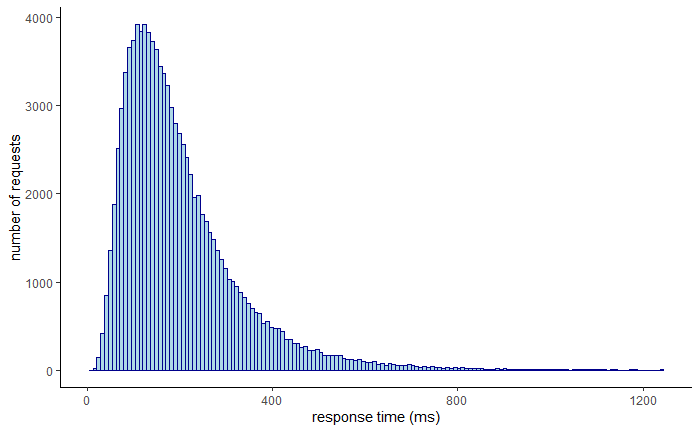
Tail latency refers to the high-end response times (or delays) experienced by a small percentage of requests in a system — usually the slowest 1%, 0.1%, or even 0.01% of requests.
For example, p99 latency means the 99th percentile latency — 99% of requests are faster than this value, but 1% are slower. That slowest 1% is called the tail.
Why Tail Latency Matters
Even if your system handles most requests quickly, a few very slow responses can:
- Ruin user experience (especially in real-time apps).
- Cascade delays in distributed systems (e.g., microservices).
- Impact SLAs (Service Level Agreements).
- Break systems relying on aggregation (e.g., waiting for 10 services to respond).
Analogy of Tail Latency
Imagine you're at a fast-food restaurant:
- 95% of customers are served within 2 minutes.
- But the last 5% are waiting 10 minutes because their food is more complex. Even if the average time is good, the long waits for the unlucky few are frustrating and degrade trust.
Example of Tail Latency
Suppose you have a Node.js server handling API requests and fetching data from 3 microservices in parallel. Here's the bottleneck:
const express = require("express");
const axios = require("axios");
const app = express();

app.get("/aggregate", async (req, res) => {
  try {
    const [serviceA, serviceB, serviceC] = await Promise.all([
      axios.get("http://service-a/data"),
      axios.get("http://service-b/data"),
      axios.get("http://service-c/data"),
    ]);
    res.send({
      a: serviceA.data,
      b: serviceB.data,
      c: serviceC.data,
    });
  } catch (err) {
    res.status(500).send("Error aggregating data");
  }
});

app.listen(3000, () => console.log("API running"));
- 3 services are called in parallel.
- If 1 of them is slow (e.g., has a p99 latency of 3 seconds), the whole endpoint waits.
- This causes tail latency propagation.
Example Tail Latency Data
| Percentile | Latency (ms) |
|---|---|
| p50 | 100 |
| p90 | 200 |
| p99 | 3000 |
| p99.9 | 8000 |
You can see that while most users experience sub-200ms responses, a few users get multi-second delays, causing a bad experience.
How to Reduce Tail Latency
- Timeouts & Fallbacks: Set timeouts for slow services and return cached/stale/partial data:
const axiosWithTimeout = axios.create({ timeout: 500 });
- Redundancy / Hedging Requests: Send requests to multiple replicas and use the fastest response.
- Load Balancing: Avoid overloading specific servers that are slower.
- Isolate Slow Paths: Identify slow services and split critical/fast and slow/non-critical paths.
- Queue Management: Use back-pressure and queues to avoid unbounded waiting.
- Monitor p95/p99 metrics not just average latency.